
Software
Claude Code, Remotely
I text a Discord channel and my laptop at home does the work.
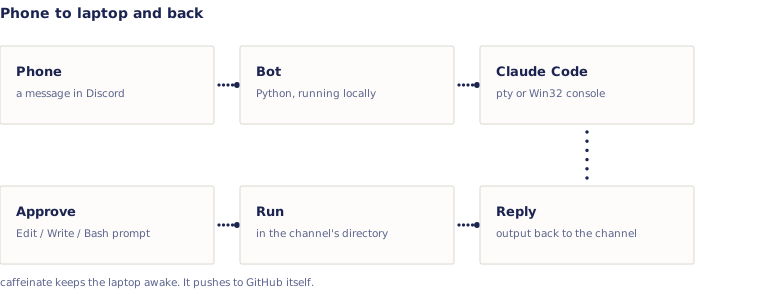
Claude Code has a remote-control feature, but it needs the phone's account to match the laptop's. Mine don't. So the phone signs into Discord instead, and the bot runs locally using the laptop's own credentials.
- Transport
- Discord channel to Python bot to Claude Code on the laptop
- macOS
- Pseudo-terminal plus screen emulation to read the rendered TUI
- Windows
- Win32 console APIs
- SDK mode
- Runs a real turn via claude-agent-sdk in the channel's working directory
- TUI mode
- Spawns a claude TUI, injects keystrokes, posts the screen back
- Approvals
- Edit, Write and Bash pop Approve/Deny buttons. Read-only tools run themselves
- Uptime
- caffeinate keeps the laptop awake. It's already signed into GitHub, so it pushes on its own
- Sessions
- cd, new, resume, list, status, cancel
Reading a terminal UI is not the same as reading text. The screen redraws in place, so scraping it naively gave me half-finished frames with the cursor mid-write, and the bot would post garbage. I had to emulate the screen properly and only send a frame once it settled.